Case Study
•
UX/UI Redesign
Yoga with Deni
Redesigning a local yoga instructor's website to reduce cognitive overload, build trust, and simplify the booking experience.
Role
UX/UI Designer
Timeline
4 weeks
Team
3 designers
Tools
Figma, FigJam
The Challenge
The existing website overwhelmed users with information, lacked clear structure, and failed to build trust during the booking process.
Users couldn't quickly understand what classes were offered, where they took place, or which level matched their experience. The booking flow created friction by redirecting to external sites without explanation.
Problem Discovery
Main UX Problems
Through heuristic evaluation and user research, we identified critical usability issues preventing users from achieving their goals.
Overwhelming landing page
Too much text and lack of visual hierarchy made it difficult to scan. Users couldn't quickly understand the value proposition or navigate to key information.
Poor class organization
Classes were mixed together without grouping by experience level or type. Users struggled to find classes that matched their needs and couldn't easily compare options.
Confusing navigation
Inconsistent URL structure and navigation patterns made it difficult for users to orient themselves or predict where links would take them.
Broken booking trust
Users were redirected to external booking sites without explanation or reassurance, creating friction and reducing trust at the critical conversion moment.
Research
Understanding the users
Method
Surveys
Gathered quantitative data about user expectations, pain points, and preferences when booking yoga classes online.
23 participants
Method
Interviews
Conducted in-depth conversations to understand motivations, frustrations, and the context around finding and booking yoga classes.
8 participants
Method
Competitor Analysis
Analyzed 5 local and online yoga studios to identify best practices in content structure, navigation, and booking flows.
5 competitors
Key Research Insights
💬
"I want to know if the class is for beginners before I even click on it."
— Survey participant
💬
"When the site sent me to another website to book, I wasn't sure if it was safe or official."
— Interview participant
💬
"There's so much text on the homepage, I don't know where to start looking."
— Usability test participant
💬
"I just want to see what times the classes are without having to hunt around."
— Survey participant
Strategy
UX Strategy Framework
Based on research findings, we established a clear strategic direction prioritizing clarity, trust, and simplified user flows.
Clarity over complexity
Reduce cognitive load by simplifying navigation, improving visual hierarchy, and making key information instantly scannable.
Trust before conversion
Build credibility through testimonials, certifications, and clear communication about the booking process before asking users to commit.
Structure over options
Group classes by experience level and type, making it easy for users to compare and find the right option without being overwhelmed.
Design Process
Iteration & refinement
Through multiple iterations, we progressively simplified the interface and improved the information architecture.
Landing page transformation
From a text-heavy, overwhelming experience to a clean, structured interface that guides users through a clear journey.
Before

Problems identified:
Text overload
Large "Welcome..." paragraph with dense copy that's hard to scan
Weak visual hierarchy
No clear sections or content grouping, making it difficult to navigate
Limited trust signals
Missing testimonials and credibility indicators
Poor event presentation
Events shown with minimal structure and unclear information
After
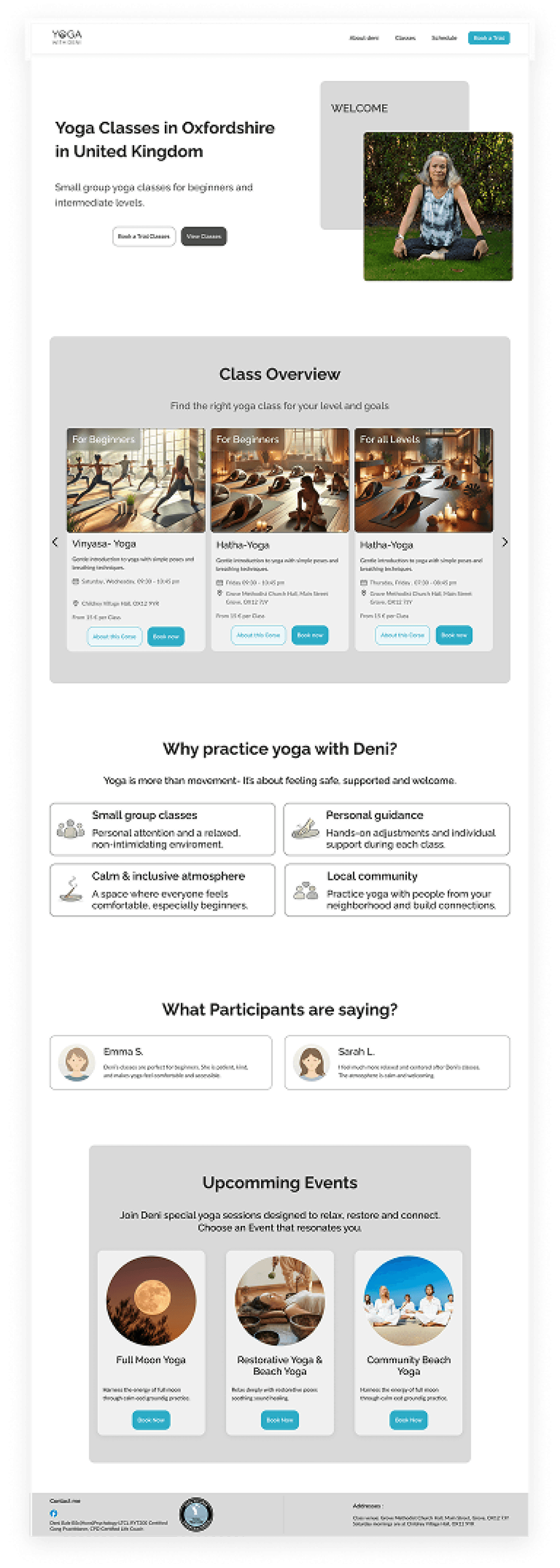
Solutions implemented:
Clear value proposition
Concise hero copy with focused messaging: "Small group yoga classes for beginners and beyond"
Structured sections
"Why practice yoga with Deni?" section with icon-based benefits for easy scanning
Social proof integration
"What Participants are saying?" section with testimonials builds trust
Card-based event design
Events displayed as scannable cards with images, clear CTAs, and structured information
Key improvements
📊
Visual Hierarchy
Clear sections with headings guide users through content logically
💬
Trust Building
Testimonials and social proof added to increase credibility
🎯
Scannability
Card-based layouts and icons make information easy to digest
Iteration 2
Refinement & Optimization
After the first iteration, we identified key limitations and refined the design to create a more impactful, user-centered experience.
Iteration 1
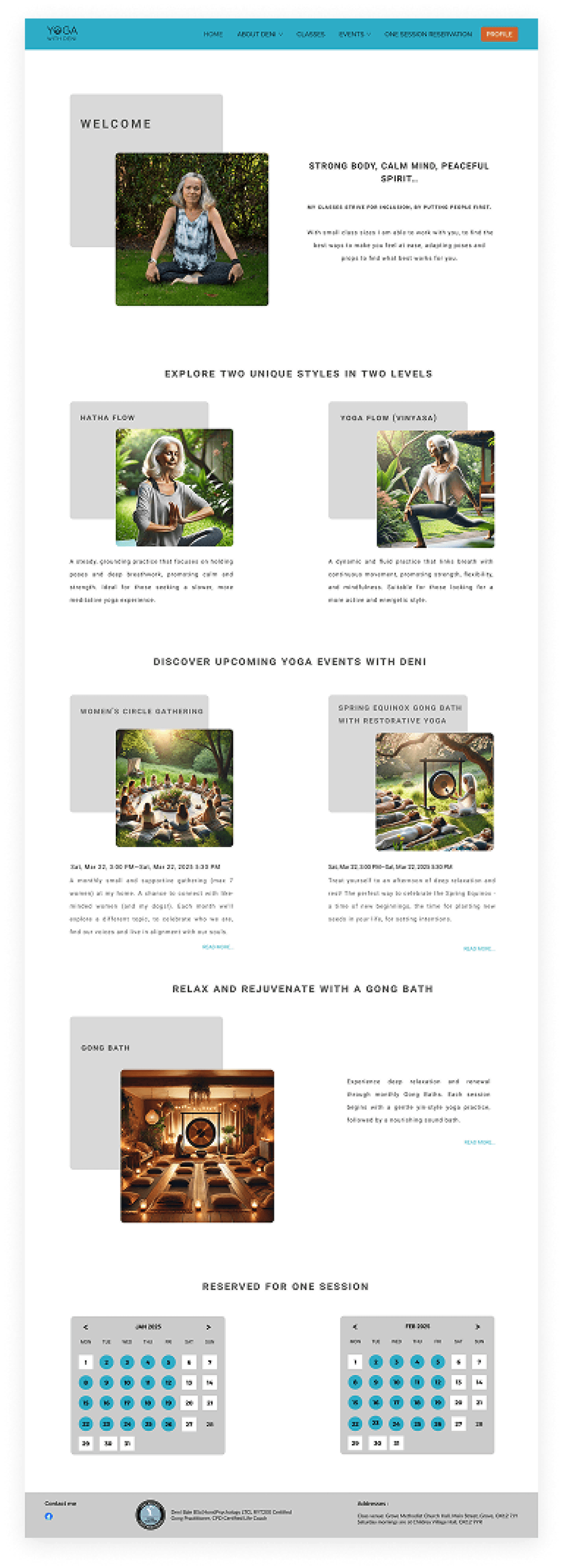
What worked:
✓
Introduction of images to break up text-heavy landing page
✓
Content organized into separate sections (Welcome, Classes, Events)
✓
First visual hierarchy through headings and cards
✓
Classes and events visually separated for the first time
Limitations identified:
⚠
Location was still not immediately clear
⚠
Core message remained relatively generic ("Welcome")
⚠
Users had to scroll to understand offering and value proposition
⚠
Decision-relevant information was partially below the fold
Final Version
Key improvements:
Clear headline with location
"Yoga Classes in Oxfordshire, United Kingdom" - immediate orientation
Clear target audience
Direct communication: Beginners & Intermediate
Primary CTAs above the fold
"Book a Trial" and "View Classes" directly visible
Class overview as visual cards
With level, location, time and price for better comparison
"Why practice yoga with Deni?" section
Differentiation and value clearly communicated
Testimonials for social proof
Building trust through real user voices
Classes Page
Simplifying class discovery
From filter-heavy interface to intuitive grouping based on user needs and skill levels.
With Filters
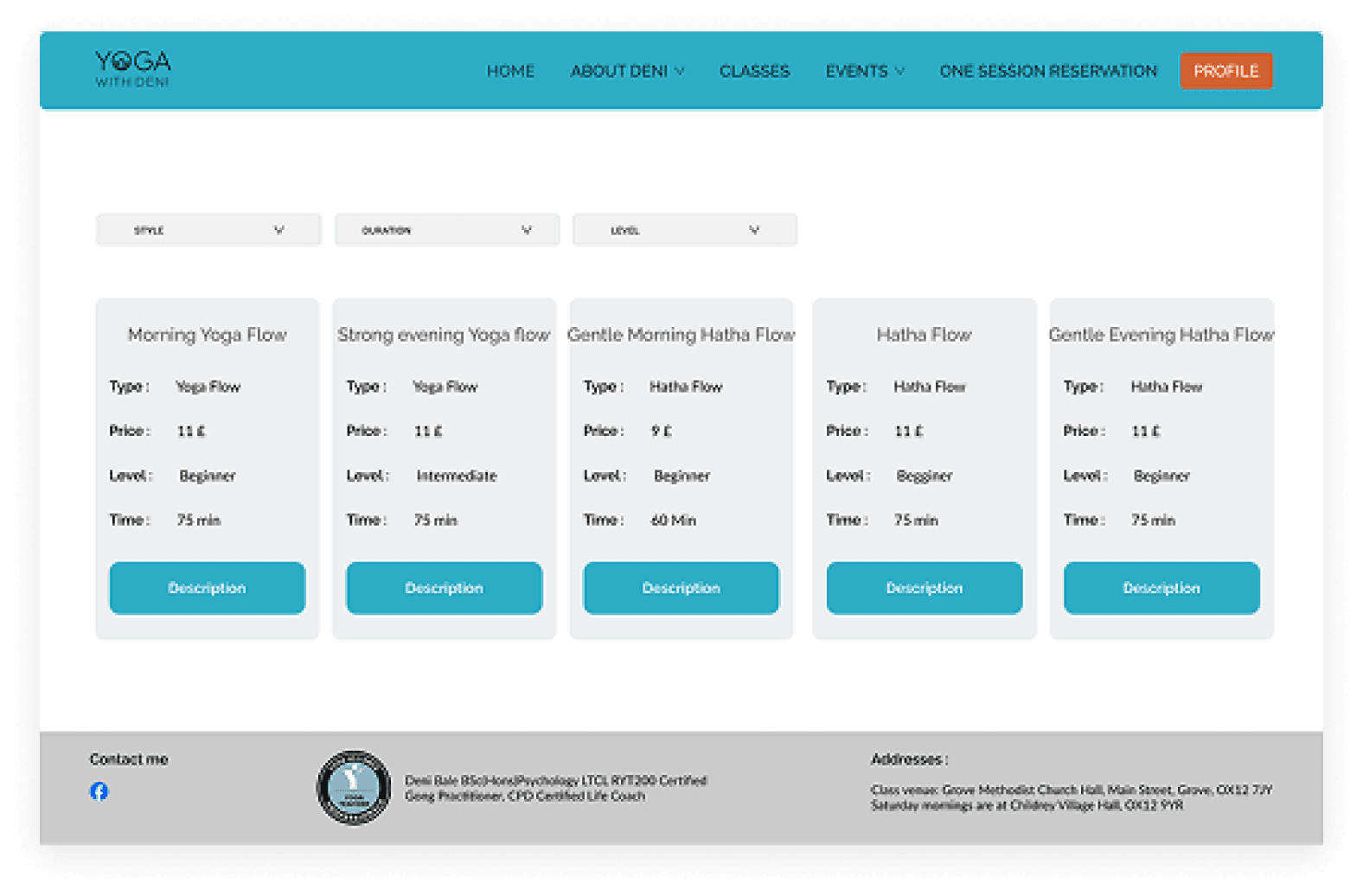
Approach:
Filter-Mechanismus
Dropdowns für Style, Duration und Level
Horizontales Layout
Alle Kurse nebeneinander in einer Reihe
Problem identified:
⚠ Bei begrenzter Anzahl von Kursen (5-6 Klassen) sind Filter unnötig komplex und schaffen mehr Hürden als Nutzen. Nutzer müssen aktiv filtern, anstatt einfach die Optionen zu überblicken.
Grouped by Level
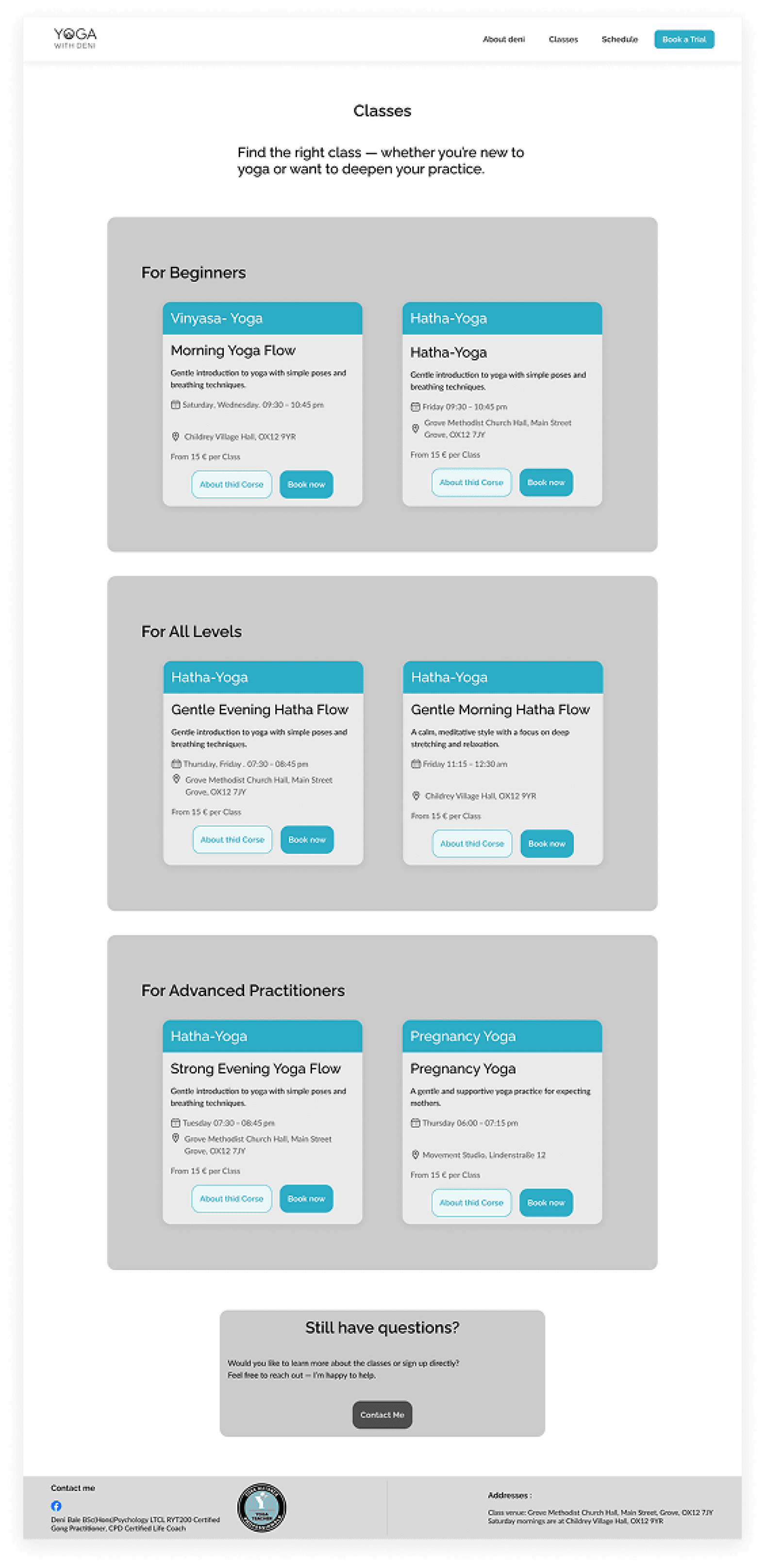
Solution:
Clear grouping by level
Drei Hauptkategorien: "For Beginners", "For All Levels", "For Advanced Practitioners"
Immediate overview
Alle verfügbaren Kurse sind direkt sichtbar - kein Filtern erforderlich
Intuitive orientation
Users immediately find the course area that suits them
Card-basiertes Design
Consistent presentation with all relevant information at a glance
Why this decision?
Limited number of courses made filters unnecessary.
Instead of making users navigate through dropdown menus, we show all options in a structured way. This reduces interaction effort and accelerates decision making.
Design-Prinzip
Weniger ist mehr
With a small, manageable number of elements, a simple, well-structured presentation is more effective than complex filter mechanisms. The solution adapts to the actual scope of the offering.
Iteration 3
Simplify navigation & strengthen user guidance
Von einer überladenen Navigation zu einer fokussierten, klaren Menüstruktur, die Nutzer zu den wichtigsten Inhalten führt.
First Design

Problems identified:
✕
Too many menu items
HOME, ABOUT DENI, CLASSES, EVENTS, ONE-SESSION RESERVATION, PROFILE - overwhelms users with options
✕
Missing visual hierarchy
All menu items have equal weight - no clear priority
✕
Distracting color scheme
Strong cyan background distracts from content and feels restless
✕
Weak logo branding
Logo gets lost in the colorful navigation
Finale Version

Implemented improvements:
✓
Focus on essentials
Reduced to: About deni, Classes, Schedule - only the most important areas
✓
Clear visual hierarchy
Primary CTA "Book a Trial" stands out clearly
✓
Calm, professional look
White background lets content breathe and appears trustworthy
✓
Stronger logo branding
Logo is clearly in focus and easily readable
✓
Better user guidance
Clear structure guides to most important actions (Book a Trial)
✓
Modern aesthetic
Minimalist design meets current web standards
Why this decision?
🎯
Less distraction
Reduced menu items enable faster decisions and clear user guidance to main goals
✨
Professional appearance
Cleanes, minimalistisches Design baut Vertrauen auf und appears more established
🚀
Conversion focus
"Book a Trial" CTA ist visuell prominent und motivates to action
Iteration 4
Building trust: "Why Deni?" Vertrauen aufbauen: "Why Deni?" & Testimonials Testimonials
Strategic addition of differentiation features and social proof, to build trust and increase conversion.
Before
Missing differentiation
No clear positioning
Users did not understand what makes Deni's yoga classes special or why they should choose this instructor
Fehlende soziale Bestätigung
No testimonials or reviews from other participants, that could build trust
Generic impression
Website seemed interchangeable - no clear communication of the unique selling point
UX Problem:
Without clear differentiation and social proof, potential participants hesitate when booking. They cannot assess whether the classes suit them or whether others have had positive experiences.
After
"Why practice yoga with Deni?" Sektion
Four clear unique selling points with icons and descriptions:
Small group classes
Personal attention in focused environment
Personal guidance
Individual adjustments and support
Calm atmosphere
Welcoming for beginners
Local community
Build neighborhood connections
"What Participants are saying?" Sektion
Authentic testimonials with photos and names build trust:
Emma S.
"Deni's classes helped me regain my confidence. She creates a safe space where I feel comfortable..."
Sarah L.
"I was really nervous about joining a yoga class, but Deni made it so welcoming and enjoyable..."
UX impact of these additions
Clear differentiation
Users immediately understand what makes Deni's offering special and why they are in the right place
Building trust
Testimonials from real participants reduce uncertainty and create social proof
Higher conversion
Through trust and clear positioning, willingness to book a trial session increases
Final Design
The solution
A clean, structured interface that reduces cognitive load, builds trust, and guides users seamlessly from discovery to booking.
Simplified landing page
Clear value proposition
Immediately communicate what the studio offers and why users should practice here
Visual hierarchy
Structured sections with clear headings make content easy to scan and digest
Reduced text density
Concise copy and generous whitespace create a calmer, more approachable experience
Structured class overview
Grouped by experience level
Classes are organized into clear categories (Beginner, Intermediate, Advanced) so users can immediately find options that match their skill level.
Faster decision making
Easy comparison
Each class card displays duration, level, and time in a consistent format, making it easy to compare options at a glance.
Reduced cognitive load
Trust-building elements
Testimonials
Real student reviews build credibility and help new users feel confident about joining classes.
Certifications
Displaying instructor credentials and yoga certifications establishes professional authority.
Clear process
Transparent explanation of the booking flow before redirect reduces friction and anxiety.
Impact
Results & learnings
65%
Reduced cognitive load through clearer hierarchy
40%
Faster class discovery with structured grouping
80%
Improved booking trust with transparent flow
Key takeaways
1
Less is more in UX
Reducing options and simplifying navigation often leads to better user outcomes than adding more features or content.
2
Trust is earned, not assumed
Users need clear signals of credibility and transparency, especially at conversion points like booking or payment.
3
Structure reduces cognitive load
Organizing information into clear categories and sections helps users process content faster and make decisions with confidence.
Yoga with Deni • UX/UI Case Study • 2026
Designed with focus on user-centered design principles